Migrate To Compose Multiplatform

This blog is a result of my journey moving from Jetpack Compose to Compose Multiplatform. While the transition looks straightforward on paper, there were quite a few real-world challenges and edge cases that only showed up once I started building things beyond Android. I’ve tried to capture the issues I ran into, the assumptions that didn’t hold up, and even a few things I expected to be problems but weren’t. The intent is to share practical learnings from this migration so others can avoid some of the trial and error and approach Compose Multiplatform with clearer expectations.
Steps
The first step I took was upgrading the existing library versions (check out the commit) and adding the required Compose Multiplatform dependencies. Very early into the process, the biggest challenge became clear — maintaining version compatibility. It’s not just about keeping Compose, Kotlin, and Gradle Plugin in sync, but also ensuring that all third-party libraries work correctly across platforms. Many libraries that work well on Android either have limited multiplatform support or require specific versions. Constantly checking multiplatform and version compatibility across different targets became an essential part of the migration.
After updating the dependencies required for Compose Multiplatform, the next step was to update our convention plugins (check out the commit). One advantage my repository already had — and something most modern projects rely on — was the use of convention plugins. They help reduce repetitive Gradle configuration and make it easier to define consistent setups across modules. More importantly, they allow you to create different plugins or configurations based on the structure and needs of your repository, which turned out to be especially useful during the multiplatform migration.
Web Support was added in next two commits 😅 (commit 1 and commit 2)
Once the convention plugins were working without any build errors, I made a mistake that cost me time later — I started migrating the core and feature modules before migrating the app module itself. This meant I was fixing compile-time issues and making migration changes in isolation, without having a runnable app to actually test anything. As a result, I was migrating and refactoring core and feature logic blindly, unaware of potential runtime issues, and without the ability to validate whether the migrated features were working as expected.
So, for this blog ill first share about the migration of the app to add support for all target platforms, which was fairly simple as I had already done the required setup in my CMP app convention plugin, so migration was as simple as adding the plugin to app gradle and moving the required dependencies in their respective "mains" .
commit for app -> composeApp and adding ios app
To make my life simpler and to avoid unnecessary build errors, and mainly to avoid fiddling with xcode i created a working sample from the official wizard (alternatively, this open source wizard by terrakok is also a pretty good option), matching my project Id and app name. The goal of this app is to test out capabilities to compose animations across the platforms, thus I ended up adding all the officially supported platforms (Android, iOS, desktop, and web, both JS and WASMJS), in an ideal world I'd migrate my core module next 😅.
Migrate core module
Core Migration commits
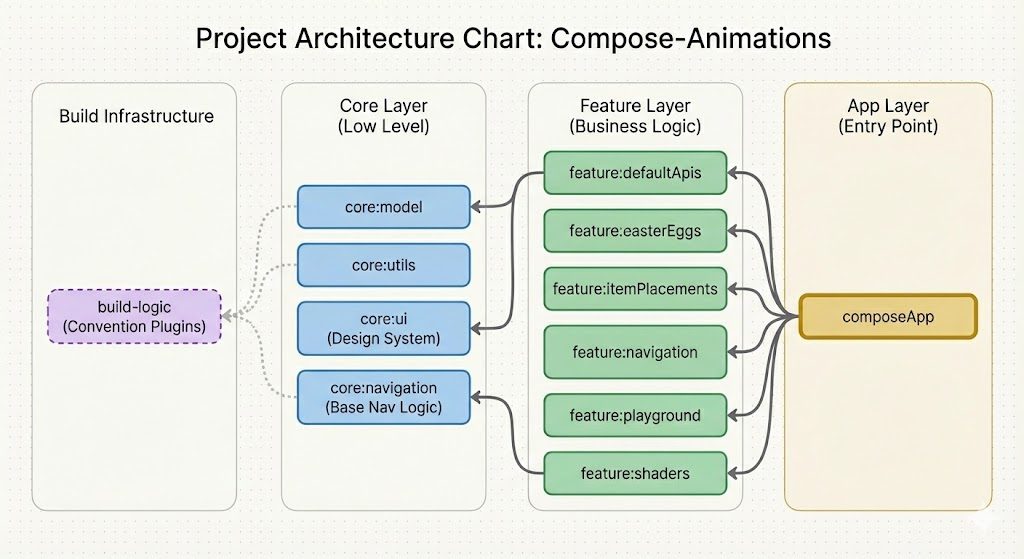
- model
- navigation
- ui
- utils
Migration of the core modules was simple, except for the navigation, which we will discuss separately. For most ofthe migration i only had to move code main to commonMain except the data store which doesn't support all the platforms yet, so I am yet to migrate the use of the data store, which I will do soon and update here.
Migrate feature module
Feature Migration commits
- defaultApis
- easterEggs
- itemPlacements
- navigation
- shader
- playground
Similar to core most of the migration only required moving from main to commonMain here since I had all my shaders in AGSL, which is android only, this needs to be migrated from AGSL to SKSL and using SKIKO.
Now, after all the required modules have been migrated and android studio automatically generating build configurations, it's navigation time.
Navigation
This project was using a custom wrapper around nav3, which made the migration easy. New nav3's working is pretty simple, new nav3 is fully composed first, it serialises to properly restore them on configuration changes or recomposition
My wrapper
My wrapper has a custom Route that all routes inherit, Route was initially an open class (I wanted to have the ability to pass common data for some Easter eggs in the future 😅, but the interface is fine for now), but that's the beauty of nav3, it gives us the developers the flexibility to do the navigation the way we want. At base, nav3 is very simple, manipulating a list of routes. Now that nav3 gives so much freedom, my goal with the Navigator was to build a single source that manages my routes rather than me manipulating a list including all the other platforms, and good to have built-in features like string-based routes support for web.

Android handles serialization with the help of reflection, but unfortunately kotlin native doesnt support reflection yet. That means there is no way to let the compiler know about the properties of the inherited object at runtime, thus we have to explicitly register the routes at compile time
    LaunchedEffect(Unit) {
        LandingRoutes.register()
        DefaultApisRoutes.register()
        NavigationRoutes.register()
        PlaygroundRoutes.register()
        ItemPlacementRoutes.register()
        ShaderRoutes.register()
    }
Not the best implementation, but it works for now, which means it can be improved.
Pain points
I stumbled upon quite a lot of issues and a few issus not issues while migration, which I'll try to list down below
- Inconsistent Build Issues - a lot of times issues were resolved by invalidating gradle cache or by cleaning up the build files.
- kotlinUpgradeYarnLock - requiring to run this cmd pretty often (or it could also be a migration thing, and it doesn't require it once your build system is fixed, but since I faced it am noting it here).
- import ComposeApp - Every time we clean build needing to launch app from Xcode first.
- Inconsistent M3 ui - Compose ui not looking and behaving same as their jetpack compose counter part.
- BIG NEED FOR KMP BOM - as stated already, we just don't have to manage compatibility of kotlin, compose and gradle but also other dependencies we use, which was a big pain point with jetpack compose earlier, which was fixed with Compose BOM.
Conclusion
As a conclusion, all I can say is compose multiplatform is at a pretty decent state to start your new cross platform projects and currently at a pretty good state for initiating a migration for KMP as big projects might not be able to migrate their ui or might not want to migrate their production ui to compose multiplatform yet ( becomes less of a blocker if you have a custom design system already) but anyways the image below is quite satisfying to look and the ability to build animation once and run it everywhere is pretty oswm.
As Always Keep Composing 💚